SKU is the code that manages each type or version of a product. When there are multiple codes and packaging sizes, the design needs to maintain a common identity but still be easy to distinguish. Zooming in on a small prototype can throw the logo, text, and space out of balance.
Determine the fixed part and the flexible part
Lock down common elements such as logo, color palette and typography. Allows you to adjust the scale, position or area to differentiate rows according to each size. Illustrate the rules on actual boxes and bags for easy implementation.
| Ingredients | How to manage |
|---|---|
| Logos | Safety interval, readable size and priority surface |
| Color | Separate samples for each material base if needed |
| Content according to product code | The change area has a clear location and rules |
| Effects | Keeping the general purpose, try each structure |
Browse a set instead of individual samples
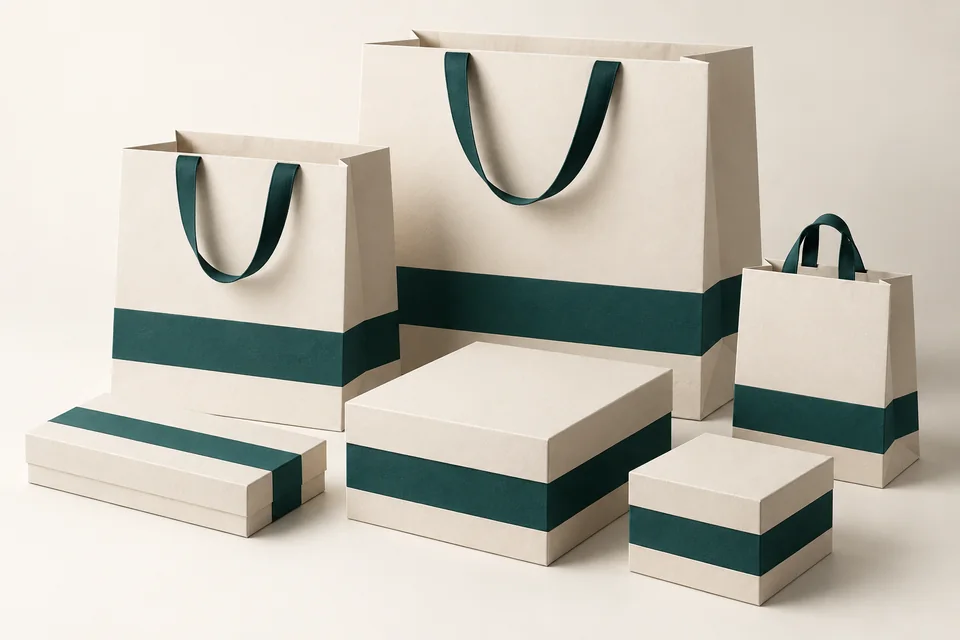
Place large boxes, small boxes, bags and accessories next to each other. Check at point of sale and in product photos. The same color code on a file may still have a different feel when the paper background or overlay changes.
Manage design files by product code
Create a table linking product codes to specifications, design files and approval status. Keep the latched original separate from the proof. When changing your identity, check all relevant forms.
Three bag sizes can have the same color and logo style but adjust the proportions on each side. There is no need to keep a distance in millimeters for all sizes if the layout is not balanced.
Maintain common features and distinguishing signs
Consistency does not require every package to be identical. Secondary colors or separate markings can be used to differentiate product lines, as long as the main identifying element is maintained.
Send SquareBag the product catalog and identifier to jointly approve a unified packaging set.
Explore Design and publishing or Exchange specifications with SquareBag.
See Packaging Design group