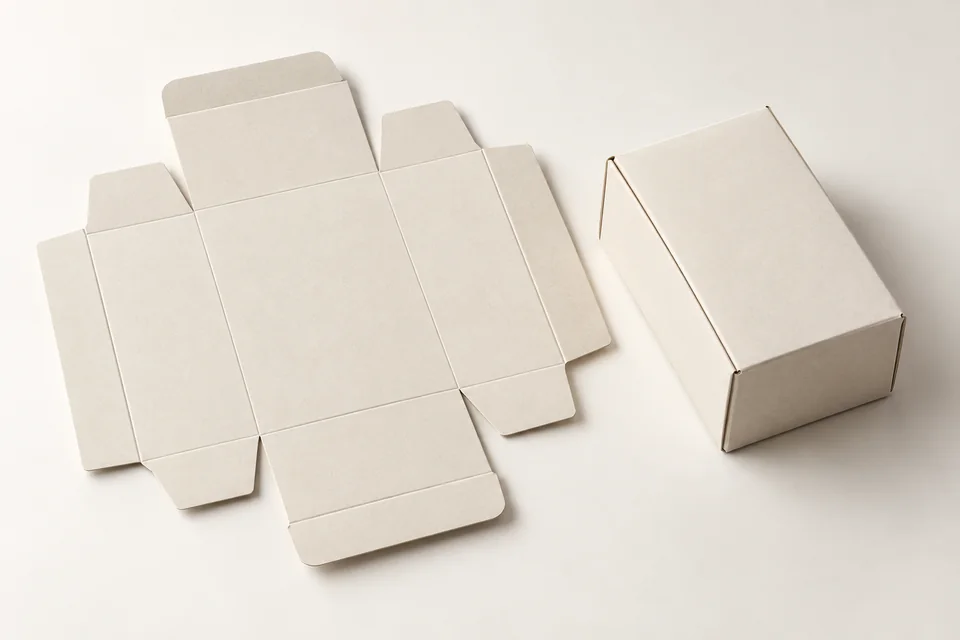
Dieline is a flat representation that shows the cut, fold, and seal areas of the packaging. The design file needs to be placed on the correct approved mold. Using the old version may cause the logo or text to be in the wrong position when building the box.
Finalize the mold before finalizing the design
Finalize internal and external dimensions, units, and mold version before finalizing the layout. If the product or tray changes, recheck the structure. Do not stretch the entire design to fit another mold.
Separation of technical layers
| Ingredients | Need clarification |
|---|---|
| Cutting and creasing lines | Separate layer, symbol according to prepress requirements |
| Paste area | Approximately excludes printing or coating according to the process |
| Overflow and safety zone | Value confirmed by the manufacturer |
| Laminated or stamped | Private class, location and implementation side |
Overflow, often called bleed, is the part of the printed image that extends beyond the cutting edge to limit the background exposure when cutting. The overflow value and safety margin need to be according to the mold and the production unit's prepress requirements.
Check fonts, photos, and colors
Check fonts, image quality at print size, and linked files. Separate the technical layer from the printed part; clearly state the laminate or stamping layer. After exporting the PDF, read back the same file that will be sent for approval.
Build a sample to check the reading direction
Print the layout at the correct scale and then test it out to see the reading direction and position of the sides. The bottom or side lettering may be turned upside down when opening the box, although each flat side still looks correct.
Submit the final file with version information
Submit a final set of files with name, version, date, and reviewer. Record changes compared to the previous version, avoid sending many files that are almost the same, causing the editor to choose the wrong one.
SquareBag can review the mold and design files with you before finalizing the plate.
Explore Packaging printing or Exchange specifications with SquareBag.
See the Printing Techniques group